DeepL Alternative: How to Compare Translation Tools Without Getting Lost in Feature Lists
Searching for a DeepL alternative usually means something specific already broke in your workflow. The quality is good enough for a draft, but not for client-facing copy. The free tier feels constrained. Your team needs an API, SSO, or tighter data controls. Or you simply want a second option next to DeepL for languages, devices, or budget.

This guide is a practical deepl alternative comparison for people in the US/en market who are evaluating tools—not collecting another generic top-10 list. You will get a decision framework, a side-by-side look at DeepL versus widely used alternatives such as Google Translate and Microsoft Translator, free-versus-paid trade-offs, and clear recommendation paths by use case.
Why people look for a DeepL alternative
DeepL markets translation around secure, efficient, accurate output, with adjacent products for writing assistance, real-time voice, document workflows, integrations, and an API for product builders ( DeepL Pro overview ). That breadth is exactly why many teams start there—and why the “alternative” search often shows up later, when one of these friction points appears:
- Quality is uneven by language pair or content type. Market-leading quality claims are useful positioning, but your French marketing page, Japanese support macros, and legal boilerplate may not all behave the same way.
- Free usage is not the same as production usage. Free translator entry points are easy to try; production needs usually force a plan decision around volume, team controls, or API access ( DeepL Translator , DeepL API ).
- Workflow fit matters more than demo quality. Browser extensions and office integrations help individuals. APIs, glossaries, and enterprise security matter once translation sits inside a CMS, help desk, or product UI.
- Coverage and modality differ. Some teams need camera/offline translation in the field. Others need document formatting preserved. Others need speech or multi-target API calls.
- Risk and compliance change the shortlist. If text cannot leave a controlled environment—or must meet enterprise security expectations—the “best sounding” demo is no longer the deciding factor.
Community threads (including DeepL alternative reddit style discussions) often surface the same pattern: people do not abandon DeepL because translation “doesn’t work.” They leave—or dual-source—because price, limits, languages, privacy posture, or integration friction no longer match the job.
A decision framework that travels across tools
Before you compare logos, score each tool against the same six criteria. Keep the scoring simple: must-have, nice-to-have, or not needed for your scenario.
| Criterion | What to test with real samples | Why it changes the winner |
|---|---|---|
| Translation accuracy & tone | 10–20 representative strings: UI labels, support replies, marketing claims, dense technical text | Demo sentences hide domain failure |
| Language pair coverage | Your actual source→target pairs, including edge locales | A strong EN↔DE tool can still fail your roadmap |
| Workflow / API integration | Paste UX, docs, office plugins, REST/API path, glossary support | Individual convenience ≠ team system design |
| Free vs paid economics | Daily volume, file types, seats, API characters | “DeepL alternative free” searches often undercount true monthly volume |
| Privacy & enterprise controls | Data handling claims, SSO, deployment options, compliance needs | Consumer apps and cloud APIs are different risk classes |
| Modalities | Text, documents, speech/voice, camera/offline | Field and meeting use cases invalidate pure text winners |
A 30-minute bake-off you can actually finish
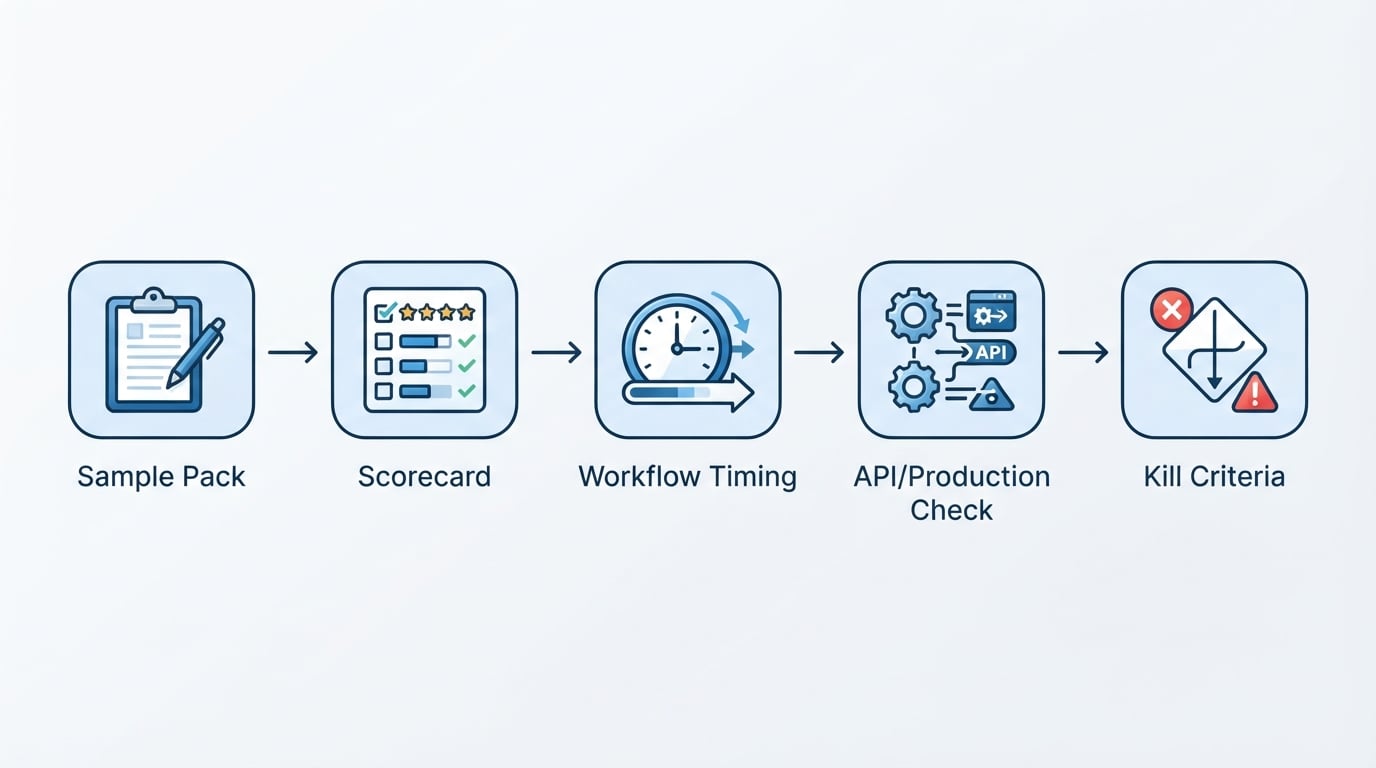
- Pick three content buckets you ship weekly (for example: product UI, customer email, PDF one-pager).
- Blind-score outputs from each candidate on fidelity, naturalness, and terminology consistency (1–5 each).
- Time the workflow, not only the translation: upload → edit → export → handoff.
- Check the production path: Can the same quality be reached via API or shared team workspace, or only in a personal web box?
- Write the kill criteria in advance (for example: “fails glossary terms,” “no acceptable data stance,” “cannot preserve doc layout”).
That bake-off is the information edge most listicles skip. Rankings without your samples are entertainment; rankings with your samples are procurement.
DeepL vs common alternatives: what each one is optimized for
DeepL: quality-first Language AI platform
Best when: You want high-quality text/document translation plus a broader Language AI surface (Write, Voice, integrations, API) and are willing to evaluate Pro/API paths for production.
From DeepL’s product surfaces, the platform is not only a paste box. It presents:
- Translator for text and documents (including PDF, Word, PowerPoint; Excel and images are also part of the documented document/feature set on product pages)
- Write for drafting/style help
- Voice for real-time conversation use cases
- API and integrations for Microsoft 365 and Google Workspace productivity tools
- Enterprise-oriented messaging around security, trust, and customization ( DeepL Pro , DeepL Translator , DeepL API )
Watch-outs: Confirm current free/paid limits and API pricing on DeepL’s live plan pages before you budget. Product pages emphasize trials and Pro paths more than fixed public quotas in one place, so treat pricing as time-sensitive and verify at purchase time.
Google Translate: ubiquitous, multimodal, consumer-strong
Best when: You need fast personal interpretation across many everyday situations—web, mobile, camera, conversation, offline packs—and broad accessibility matters more than a specialized enterprise translation stack.
Google positions Translate as a personal interpreter on phone or computer, with features such as camera translation, offline language downloads, conversation mode, speech transcription, handwriting input, saved translations, document upload with formatting preserved, and full webpage translation by URL ( Google Translate about ).
Watch-outs: The consumer about page emphasizes communication breadth, not enterprise procurement detail or API packaging. If you need a governed business API, evaluate Google’s cloud translation products separately rather than assuming the consumer app equals the developer stack.
Microsoft Translator: Microsoft ecosystem + Azure API path
Best when: Translation must live inside Microsoft-heavy work (Office, Edge, Teams-adjacent workflows) or you want a cloud API with explicit business packaging.
Microsoft describes real-time conversation and offline translation for menus and signs via Translator apps, with business translation through Translator API and Speech service in Azure AI Services ( Microsoft Translator ). On the business/API side, Azure Translator highlights neural machine translation, multi-target translation in one request, language detection, transliteration, bilingual dictionary features, Custom Translator for domain-specific models, and an on-premises option for high-security needs. Microsoft also states submitted text is not written to persistent storage in the described service posture, and points to compliance certifications such as HIPAA, ISO, SOC, and FedRAMP on the business API page. A free tier is described as up to 2 million characters per month, with paid Azure subscription options for higher volume ( Azure Translator API ).
Watch-outs: Consumer app convenience and Azure production controls are related brands, not identical products. Validate the exact SKU you will bill.
Where a “DeepL Write alternative” fits (and where it doesn’t)
People sometimes type DeepL Write alternative when their real job is drafting and tone control, not translation. DeepL explicitly separates Write (enhance writing / adapt to audience) from Translator ( DeepL Pro ). If your pain is monolingual editing, compare writing assistants on their own rubric. If your pain is cross-language delivery, keep translation accuracy, glossary control, and bilingual review in the center of the scorecard—and treat writing tools as adjacent, not interchangeable.
Free DeepL alternative reality check
Queries like DeepL alternative free and Free DeepL alternative are rational—and incomplete.
Free tiers are excellent for:
- personal travel and ad-hoc comprehension
- early experimentation on sample content
- low-volume internal drafts
Free tiers usually break when:
- monthly character/document volume becomes continuous
- multiple teammates need shared terminology
- you must ship via API inside a product
- security/compliance stakeholders enter the thread
A practical budgeting rule:
- Measure last month’s real volume (words/characters + file count).
- Multiply by a growth factor you actually believe (not a vanity 10x).
- Price the workflow (human post-edit time + tool cost), not the subscription alone.
- Keep one free/low-cost backup for emergency human comprehension even if a paid tool wins production.
Microsoft’s business API messaging is unusually explicit about a free monthly character allowance on the Translator API page; DeepL’s public product pages emphasize free translator entry and Pro/API trial paths. Because packaging changes, re-check the vendor’s current pricing surfaces before you lock a vendor-of-record decision.
Side-by-side snapshot (decision-oriented, not a trophy ranking)
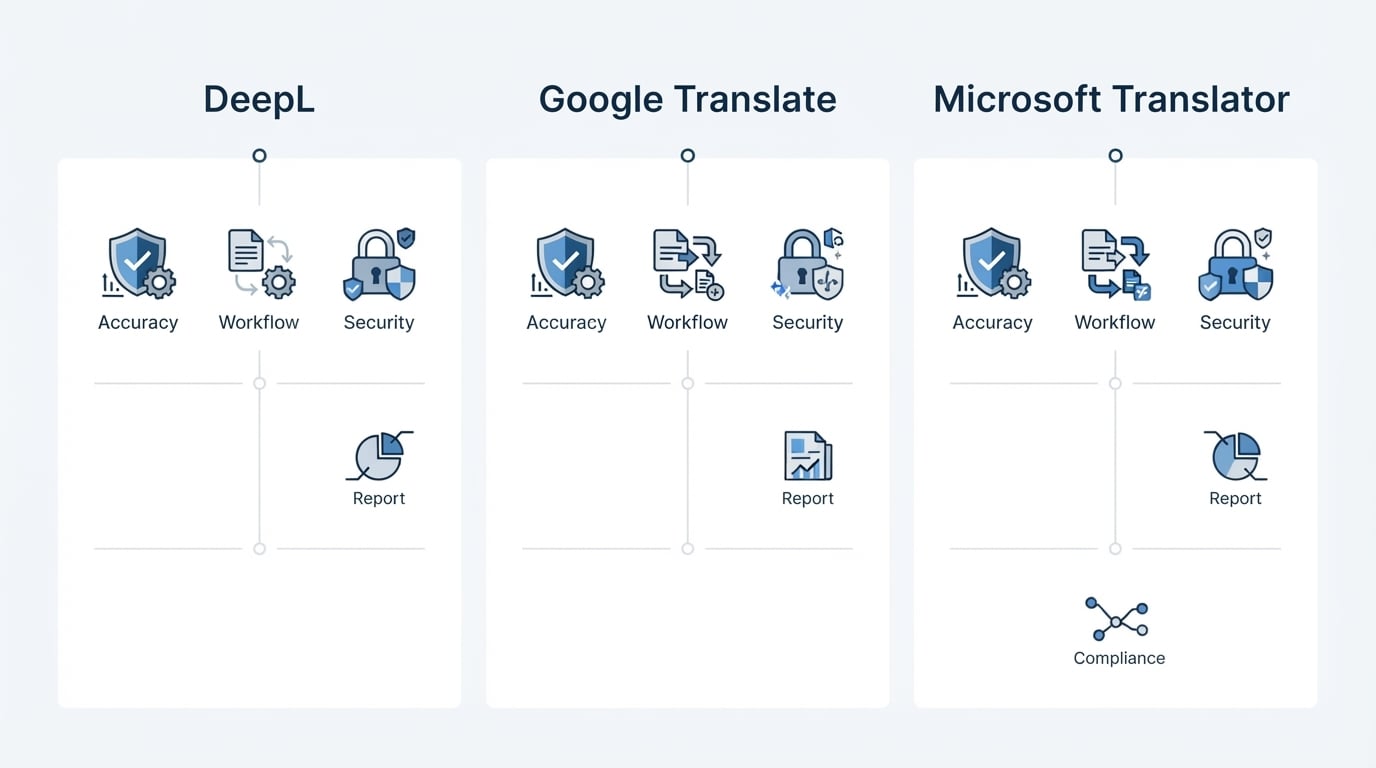
| Need | DeepL | Google Translate | Microsoft Translator / Azure Translator |
|---|---|---|---|
| Everyday personal translation | Strong web/app translator positioning | Very strong multimodal personal use | Strong apps + conversation/offline scenarios |
| Document-heavy knowledge work | Explicit document translator positioning (PDF/Word/PPT and related formats on product pages) | Document upload with formatting preserved on about page | Business/API and Microsoft ecosystem paths |
| Product/API integration | First-class API product surface | Consumer about page is not the API contract | Explicit Azure API packaging + free tier stated on business page |
| Domain customization | Customization / glossary oriented enterprise messaging | Not the focus of the consumer about page | Custom Translator called out for industry-specific models |
| High-security deployment options | Enterprise security & trust positioning | Not detailed on consumer about page | On-premises option called out for high-security needs |
| Speech / real-time conversation | DeepL Voice called out on platform pages | Conversation + speech features on about page | Speech service paired with Translator for business |
No single column “wins.” The winning column is the one that matches your must-haves without failing a kill criterion.
Recommendation paths by use case
1) Solo professional or student (mixed languages, low volume)
Start with DeepL’s free translator for quality-sensitive drafts and keep Google Translate installed for camera/offline/conversation moments. Promote to paid only after you can show weekly volume and revision time.
2) Content, marketing, or localization teammate
Prioritize terminology consistency and document workflows. DeepL’s glossary/document/integration story is often the right first bake-off partner; add Microsoft if your canonical files live in Microsoft 365 and you need tighter platform alignment.
3) Product, engineering, or workflow-heavy team
Ignore consumer UI polish until the API path is proven. Compare DeepL API capabilities against Azure Translator (multi-target requests, custom models, security options, stated free character tier). Run the same evaluation pack through the API, not only the website box.
4) Support, operations, or public-facing multilingual UX
Optimize for turnaround and coverage. Google Translate’s multimodal breadth can unblock frontline staff quickly, while a governed API (DeepL or Microsoft) may still own the customer-visible canonical text.
5) Regulated or security-sensitive environments
Begin with vendors that publish enterprise security posture and deployment options you can take to legal/IT. Microsoft’s business page explicitly calls out compliance certifications and an on-premises option; DeepL emphasizes enterprise security and trust center materials. Your counsel—not a blog table—closes this loop.
How to choose in one working session
Use this close-out checklist:
- Define the job in one sentence: “Translate customer emails with legal-safe consistency,” not “find a DeepL alternative.”
- Lock must-have criteria (language pairs, API, offline, docs, security).
- Run the 30-minute bake-off on real samples.
- Price the production path, including human edit time.
- Pick a primary + fallback. Dual-source strategies are normal: one tool for quality-critical publishable text, another for field comprehension or emergency coverage.
- Re-verify pricing and data terms on the vendor’s official pages the day you buy. Comparison articles age faster than procurement cycles.
Bottom line
A good DeepL alternative decision is less about crowning a universal winner and more about matching accuracy, workflow integration, free/paid economics, and risk controls to the work you actually ship. DeepL remains a strong quality-and-platform contender; Google Translate remains the default multimodal personal interpreter; Microsoft Translator is compelling when Azure/API controls and Microsoft ecosystem fit dominate.
If you only do one thing after reading this: stop collecting logos, and run the same sample pack through two finalists on the path you will truly use—web UI or API—then choose the tool that survives your kill criteria with the least post-edit labor.