What Is an AI Workflow Guide? Everything You Need to Know
Intro

Scrolling through endless tabs, copy-pasting between tools, losing track of what comes next — if you rely on AI for anything beyond the occasional chatbot query, you have felt the friction. Most people start with excitement, fire off a prompt, get a decent result, and then stall. The problem is not the AI. It is the absence of a repeatable process around it.
An AI workflow guide is exactly what the name suggests — a structured, step-by-step framework that tells you how to interact with AI tools in a specific context, what inputs to prepare, how to evaluate the outputs, and where to loop back for improvement. It transforms AI from a one-shot novelty into a reliable part of your daily operations. Think of it less as a manual and more as a playbook: you do not read it once and forget it; you run it, adapt it, and run it again.
Definition

So what distinguishes an AI workflow guide from a simple list of tips? At its core, a workflow guide defines a sequence of decisions and actions that turns raw input — a brief, a dataset, a question — into a finished outcome, with AI handling specific steps along the way. It answers three questions: What do I feed the AI? What do I want it to do? And what do I do with what it returns?
A proper AI workflow guide typically includes:
- Input preparation — how to structure source material so the model has the right context.
- Prompt design — what instructions, constraints, and formatting to apply per step.
- Output evaluation — how to judge whether the result is usable or needs revision.
- Feedback loops — where human review fits and how to feed corrections back in.
This is opinionated by design. A good guide does not pretend there is one universal way to use AI. Instead, it makes a bet on a particular approach — structured prompting over freeform chat, human-in-the-loop review over full automation — and explains why that bet works for the use case it targets.
Deep Dive

The real value of an AI workflow guide shows up when the process involves multiple stages and the stakes are higher than a one-off answer. Let me walk through a concrete example drawn from the language-learning space, where Felo's product team has built structured courses aligned to the CEFR framework — a case study in how workflow thinking elevates AI-guided learning.
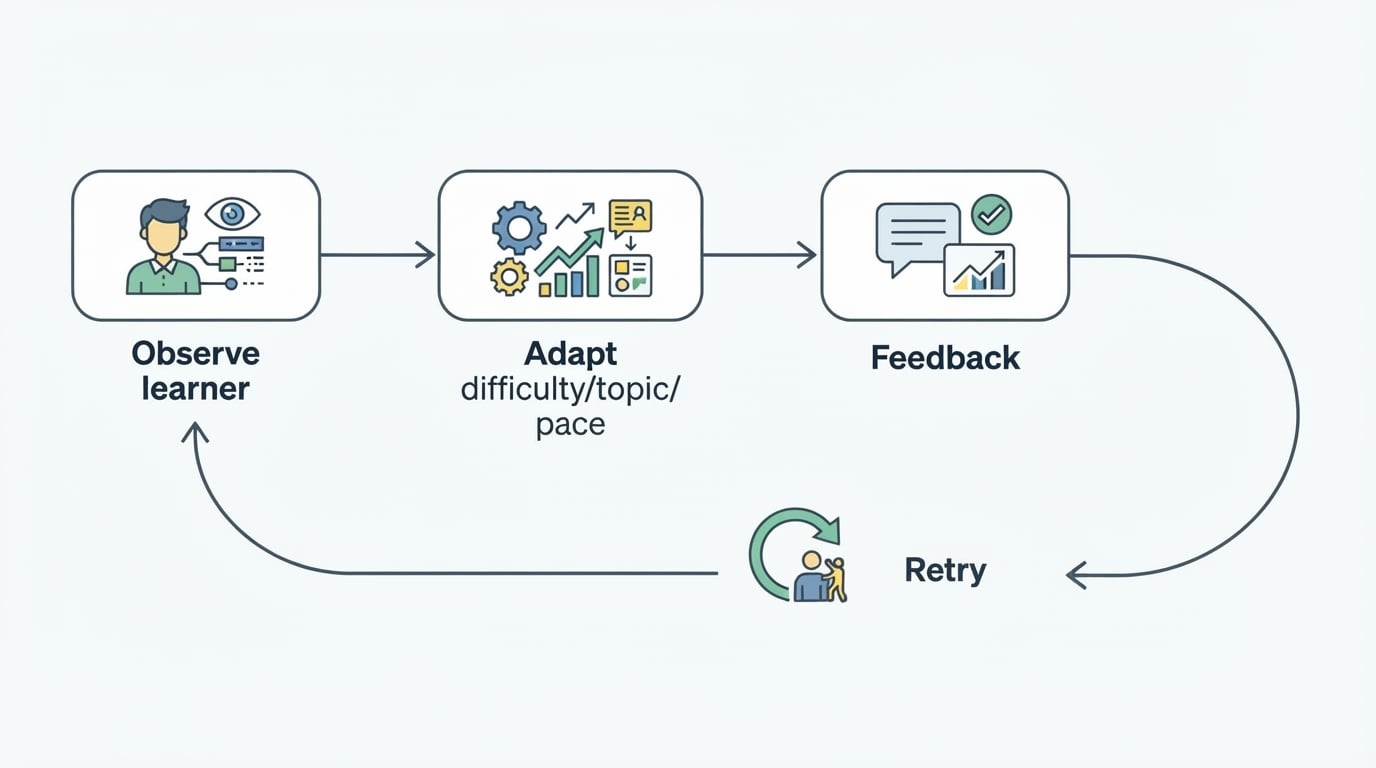
CEFR — the Common European Framework of Reference for Languages — has long been the gold standard for measuring proficiency, but applying it in a digital product is anything but straightforward. An AI-driven language app cannot just label a lesson "A2" and call it done. It needs a workflow: assess the learner's current level, surface content at the right difficulty, introduce new structures incrementally, check comprehension, and adjust the path when the learner struggles or accelerates.
In Felo's implementation, the product team broke this into visible steps. The course overview page presents CEFR language-level cards that describe what A1 and A2 proficiency looks like in practical terms — not abstract descriptors, but concrete can-do statements about what a learner at that level should be able to understand and produce. The interface itself becomes a workflow guide: the learner sees their current level, the next level above it, and the skills gap they need to close. The AI handles content generation at the right complexity tier, while the learner stays in control of pace and direction.
This is the pattern that separates structured AI use from ad-hoc prompting. The workflow guide — whether embedded in a product interface or written as a standalone document — makes the invisible architecture of a good AI interaction visible. It does not just say "use AI to learn Spanish." It says: first, establish your starting level. Next, select content calibrated to that level. Then, practice with AI-generated exercises that target your weak areas. Review. Repeat.
What makes this approach powerful is that it reduces cognitive load. Without a workflow, the learner (or the professional using AI for any complex task) has to manage two things at once: the domain work itself and the meta-work of figuring out how to use the tool effectively. A good AI workflow guide eliminates the second burden. It front-loads the methodological thinking so you can focus on execution.
Use Cases

AI workflow guides apply far beyond education. Here are three scenarios where they make a decisive difference:
Content production. A marketing team producing blog posts at scale does not hand each article to ChatGPT raw and hope for the best. They build a workflow: research brief → outline with keyword targets → first draft with citations → editorial review → tone pass → final polish. The AI handles the drafting and some of the research; humans own the strategy, the angle, and the final sign-off. The workflow guide is what keeps the process reproducible across ten writers and fifty posts.
Data analysis. A data analyst who wants AI to help interpret a messy CSV does not dump the whole file into a prompt. A workflow guide might say: clean and sample the data first → ask the AI to suggest three analytical angles → run the angle with the strongest signal → have the AI draft a narrative summary → verify the numbers against the raw source. Each step has a clear input and a clear exit criterion.
Customer support escalation. Support teams using AI triage can follow a tiered workflow: first, the AI matches the ticket to known solutions and drafts a reply. A human reviews for tone and accuracy. If the issue is unresolved, the AI summarizes the conversation thread and suggests diagnostic steps for the next tier. The workflow guide prevents the AI from escalating prematurely or sending half-baked answers.
In every case, the workflow guide acts as guardrails and scaffolding — it prevents the AI from wandering into irrelevant territory and gives the human a clear role at each stage.
Faq
Is an AI workflow guide the same as a prompt template?
No. A prompt template is a single input to a single AI call. A workflow guide covers the entire process — multiple prompts, human review steps, and decision gates. Templates are components; the guide is the architecture.
Do I need a workflow guide for simple tasks?
Probably not. Ask yourself: does this task have more than two stages, or does getting it wrong carry real cost? If the answer to both is no, a single prompt is fine. If the answer to either is yes, a workflow guide will save you time and mistakes.
Who should create AI workflow guides?
Anyone who uses AI repeatedly for the same kind of task. A solo consultant building client reports, a five-person marketing team, a customer success department — the investment of writing the guide once pays back every time you run the process without reinventing it.
How detailed should a workflow guide be?
Detailed enough that someone unfamiliar with the specific AI tool can follow it and produce a usable result, but not so detailed that no one wants to read it. A good rule of thumb: if you need to skip steps to stay sane, the guide is too long. If you keep wondering "what now?", it is too short.
Conclusion
The AI workflow guide is not a technical document. It is a discipline — the discipline of treating AI as a collaborator you train, direct, and review, rather than a magic box you shout at until something falls out. The best AI users I have seen share one trait: they do not improvise. They build systems. They document. They iterate on the process itself.
If you are using AI for anything that matters more than once, stop prompting from scratch. Write down your process. Test it. Share it. That act of writing is what turns an experimental tool into a reliable part of how you work. The AI workflow guide is the difference between hoping for good results and knowing how to produce them on demand.